Why is do not disturb android still letting calls through?

owenashford

New member
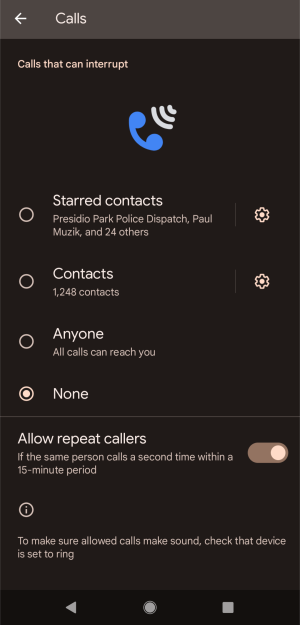
I have enabled the do not disturb android toggle, but my phone still rings when certain people call. I need it to be completely silent during my shift. Is there a priority setting I’m missing that overrides the DND mode?
 

Attachments

  • IMG 14642784.png
    IMG 14642784.png
    251.9 KB · Views: 0
Android Do Not Disturb is likely to be bypassed through active exceptions in calls. Check your settings for:
  • Repeat Callers: Acceptable provided the individual making the calls makes two calls within 15 minutes.
  • People: Choose to be able to allow either Starred contacts or All contacts.
 
Because Do Not Disturb allows exceptions by default. Calls can still come through if repeat callers, starred contacts, or allowed apps are enabled in DND settings.
 
Do Not Disturb has the possibility of not blocking out the phone since there are exceptions that can be activated, including repeated calls, starred contacts, or emergency alerts. This can be corrected by ensuring that you check your settings in the DND and turn off allowed calls, favorites and repeating calls.
 
Toggles Do Not Disturb could still admit calls due to the exceptions it has been enabled with, like frequent callers and favorite contacts or emergency alerts. The problem is normally resolved by checking and fine tuning the DND settings and a complete silence is restored.
 
On Android, Do Not Disturb (DND) may still let calls through because:
  • Priority settings allow calls from favorites or repeated callers
  • Alarms and reminders are often exempt
  • App-specific exceptions are enabled
Check Settings → Sound → Do Not Disturb → Exceptions to adjust.
 
Back
Top